How does Global Maker pay for advertising?
Global makers can also pay for advertising.
Once you top up your BizMoney, you can use all advertising products in the Ad Center and Biz Center just like Korean makers.
- What is BizMoney? It is a prepaid payment method used to pay for advertising products in the wadiz Advertising Center and Biz Center. It is managed based on your business registration number and can be used for funding, pre-order, and store projects.
- Global makers: If the business registration address on your maker account is outside of South Korea
There are two ways to top up your balance.
|
Category
|
Card Top-Up
|
Bank Transfer (International Transfer)
|
|
Payment Methods
|
Credit and debit cards accepted for international payments
|
Bank Transfer |
|
Supported Currencies
|
KRW
|
USD, CNH, HKD |
|
How to Apply
|
Top up directly at Go Center or Biz Center | Contact Customer Service for instructions |
|
Credit Reflection
|
Immediately | After deposit confirmation (based on business days) |
|
If Necessary
|
When you need to run small-amount or immediate ads | When a large top-up exceeding your credit card limit is required |
|
Receipt
|
Invoices can be issued | Invoices can be issued |
Please be sure to check them out.
- Global makers can only pay for advertising fees using BizMoney. Post-payment (deduction from settlement) is not available.
- Bank transfers are supported only in USD, CNH, and HKD. Transfers in CNY or KRW are not permitted.
- We issue receipts in the form of invoices instead of tax invoices.
Top up with a credit/debit card (instant top-up)
- Log in to the Ad Center or Biz Center.
- Select [Top Up BizMoney].
- Enter the top-up amount (KRW) and pay with a card capable of international transactions.
- The amount will be credited to your BizMoney balance immediately upon payment, and you can place ads right away.
※ Card payments do not support installment plans.
※ If you are unable to top up the full amount in a single transaction, please use the bank transfer method below.
Top Up via Bank Transfer (International Transfer)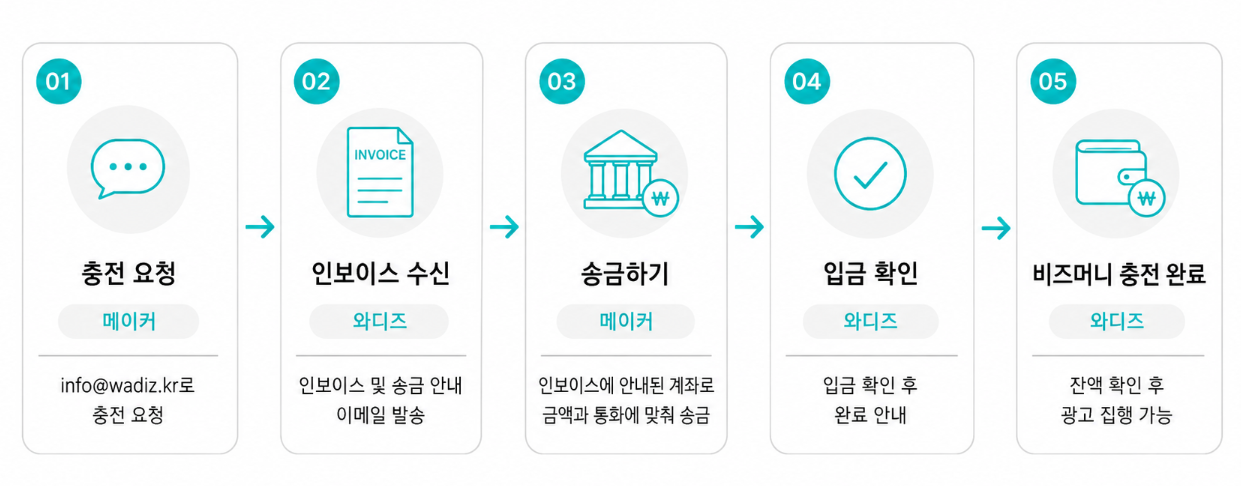
[BizMoney Bank Transfer Top-Up Request]
1. Maker Name (Business Name):
2. Country of Business Registration / Business Registration Number:
3. wadiz maker account email:
4. Desired Top-Up Amount (in KRW):
5. Desired Transfer Currency (select from USD, CNH, or HKD):
6. Email address for receiving the invoice:
7. Contact Person’s Name / Contact Information:
STEP 2.Receivethe InvoiceOnce the wadiz Advertising Team reviews your request, we will email you an invoice and payment instructions.
STEP 3. Make the payment. Please transfer the exact amount and currency specified on the invoice. If the amount differs, it will take additional time to verify and correct the information.
STEP 4. wadizconfirms the payment. Once the payment is confirmed, a representative will notify you that the process is complete. (Processing takes place on business days, and the confirmation time may vary depending on the transferring bank and currency.)
STEP 5. Check Your BizMoney Balance and Run Your Ad. You can check your balance in the Ad Center or Biz Center and apply for an ad immediately.
FAQ
Q. Can I use post-payment (deducted from settlement)?
No. Global makers can only use the BizMoney (prepaid) method.
Q. Can I make a bank transfer in CNY?
No. Bank transfers are supported only in USD, CNH, and HKD. Transfers in KRW are not allowed, and KRW payments are only available for card top-ups.
Q. Can I receive a tax invoice?
For Global Makers, we issue a receipt in the form of an invoice instead of a tax invoice.
Q. Can I get a refund for BizMoney I’ve topped up?
You can request a refund after all advertising campaigns have ended and settlement has been completed. Amounts resulting from transfer fees or exchange rate differences are excluded from refunds.
Q. I received a payment (transfer) link that isn’t from the wadiz domain. Is it safe?
Wadiz sends payment links through a global payment processing service, so the domain may differ.
However, wadiz invoices and payment instructions are sent exclusively via the @wadiz.kr email address or through your assigned manager’s official channels.
Please do not transfer funds to any account or link received through other channels; please verify the details first at info@wadiz.kr로.
Inquiries: info@wadiz.kr