[Service Notice] Guide to the Scheduled Posting Feature for News Updates
Hello, we're Wadiz.
A new news reservation posting function has been added so that you can post new news according to the schedule you want.
Now, when you pre-write new news and set the date and time to post it, the new news will be automatically released at the time you booked it.
- Date of application: September 11, 2026 (Fri)
- Route: Maker Studio > New News > Create New News
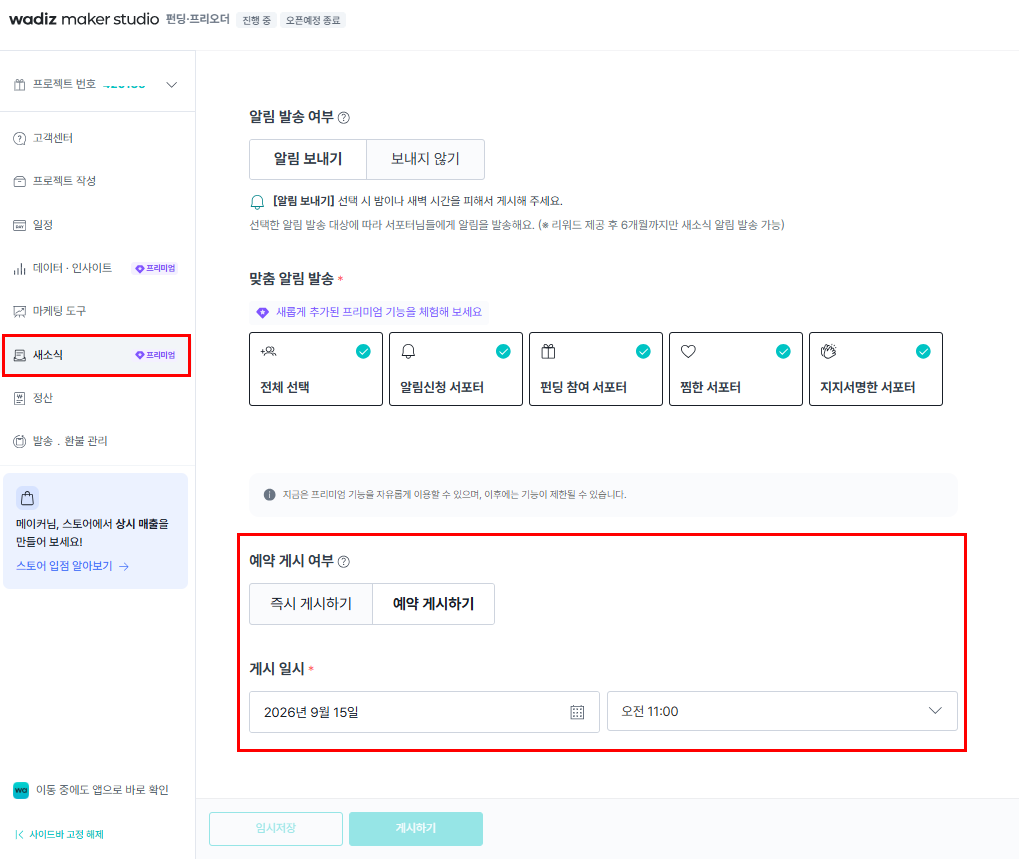
1. You can schedule new news on any date and time you want.
On the New News Creation screen, under Whether to post a reservation, select Post a reservation, and then set the desired date and time of posting.
| Sortation | content |
|---|---|
| How to publish | Post immediately or on the schedule |
| Reservation available time | Select in 15-minute increments after 10 minutes from the current time |
| Booking Publishing | Auto-release at the set date and time |
| Modifying the reservation | New news content and reservation date can be changed before new news is released |
| Reservation cancellation | It is possible until new news is released, and even if it is canceled, the new news written can be maintained |
2. Notifications are sent when new news is released.
If you have notification sent, it will be sent once to the destination you set when the new news is actually released.
| reservation time | the release of news | App push notification |
|---|---|---|
| 8 a.m. to 9 p.m | Revealed at the time of reservation | Send when new news is released |
| 9 p.m. to 8 a.m. the next day | Revealed at the time of reservation | Shipment at 8am the next day |
Use the new news reservation posting function to manage project news more conveniently.
Wadiz will continue to make efforts to make the project more convenient for you.
Thank you.
Wadiz's dream