Wadiz ローンチ前資金調達成功ガイド
Last Updated: 2026-09-03
Wadiz is Korea's leading reward-based crowdfunding platform, and it gives every maker three connected tools to build momentum before a campaign opens: a Launching Soon period to collect notification sign-ups, a News Updates channel to talk to supporters throughout that period and beyond, and a trial group tactic that uses News Updates to seed real reviews in your Community the moment you launch. Used separately, each one helps. Used together, in sequence, they compound — this guide walks through exactly how.
Step 1: Open a Launching Soon Page to Start Collecting Notifications
Launching Soon lets you preview your project like a trailer before your main campaign officially opens, running anywhere from 7 to 25 days beforehand. During this window, interested supporters can sign up for notifications, and that list is what everything else in this guide builds on.
Why It Boosts Your Results
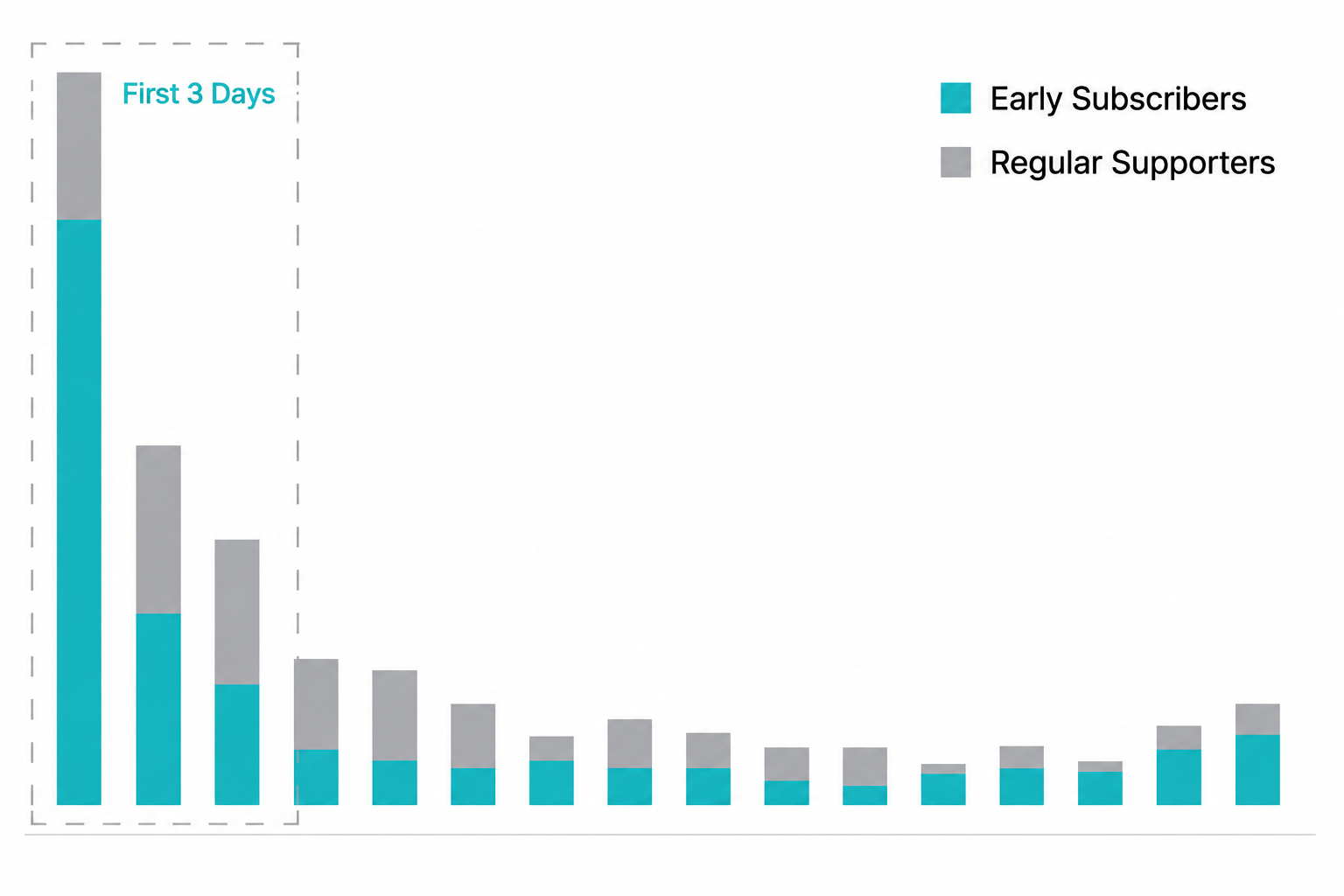
The reason this matters so much comes down to timing: on average, the first 3 days after a project opens account for about 53% of its total funding, and over 60% of that early money comes from supporters who signed up for notifications during Launching Soon. Skip this step, and you're launching without the audience that typically drives more than half your result.
Three More Benefits
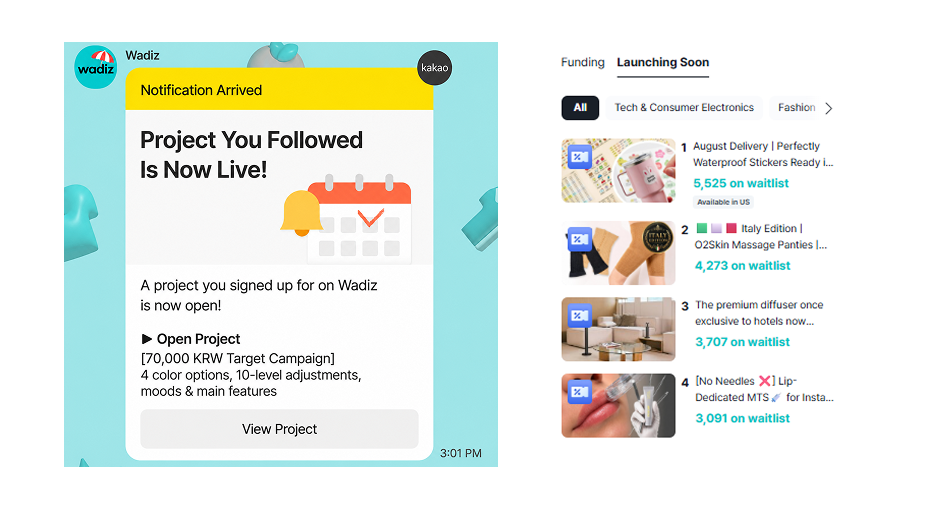
Beyond the money, Launching Soon does three more things for you. It automatically notifies your signed-up supporters by SMS and Kakao the moment your project goes live, with a direct link to jump straight into funding. It gets your project featured across Wadiz in places like the Early Bird tab and the Launching Soon section, on top of whatever promotion you run yourself. And it gives you a live read on demand before you've committed to anything: Maker Studio shows daily sign-up trends, so you can gauge real interest and adjust your post-launch plan accordingly.
How to Set It Up
Write your story in the Launching Soon Story tab at the bottom of Maker Studio's story editor — you can reuse your main story as-is, just remove any shipping-schedule details, since those won't be accurate yet. Once your project is approved and you've picked an opening date, the Launching Soon page goes live automatically and runs until that date arrives.
Step 2: Use News Updates to Keep That Audience Engaged
Once your Launching Soon page is public, the News Updates board activates, and this becomes your main channel for talking to supporters for the rest of the campaign and beyond. You can post as often and in whatever format you like, choose exactly who receives each update (everyone, only backers, only notification sign-ups, and so on), and optionally trigger a push notification and email alongside it.

Posting Guidelines
A few practical guidelines matter here. Post no more than once every 3 days — daily updates tend to fatigue supporters rather than build engagement — and aim for the 11 AM to 5 PM window rather than very early or late. You can also pin one News Update to the top of your story for extra visibility, though a pinned update written during Launching Soon disappears once the campaign opens, so plan to write and pin a fresh one at that point.
Beyond the Pre-Launch Period
News Updates aren't just for the pre-launch period, either. They're the same channel you'll use for milestone announcements, shipping updates, encore promotion, and post-campaign communication, which is exactly why the next section — recruiting a trial group — runs entirely through this tool.
Step 3: Run a Trial Group to Seed Reviews Before You Even Launch
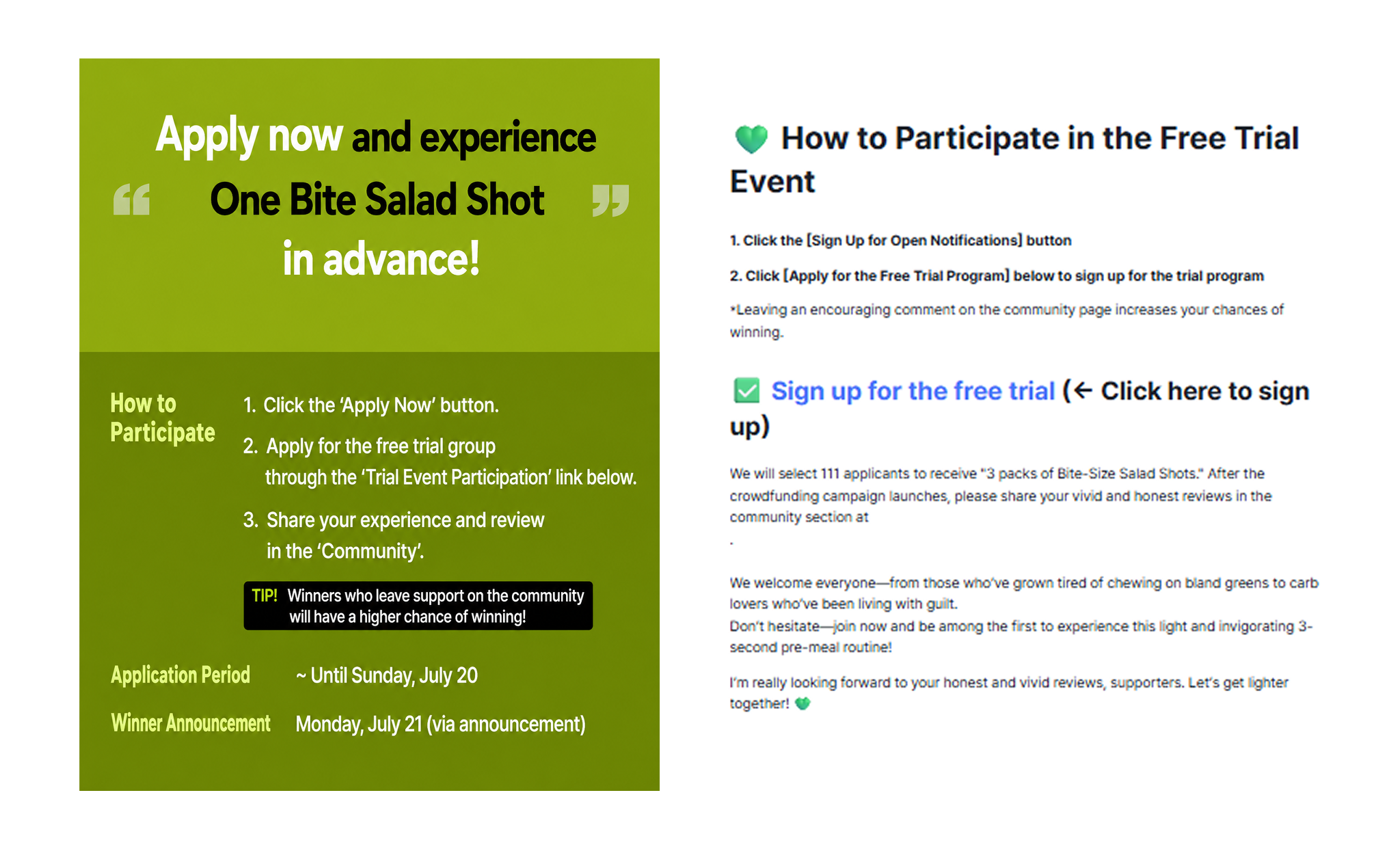
A trial group is where the first two tools come together into a specific tactic: during your Launching Soon period, you recruit a small group of supporters through a News Update, get your reward into their hands before launch, and have them post the first honest reviews in your Community the moment your project goes live.
Why It Works
The appeal here is that it doesn't take much to work. You don't need a warehouse of samples or a huge participant list — size the group to your reward, and even a handful of participants is enough to get real reviews live from day one. What matters more is timing and structure: recruitment, selection, and shipping all need to wrap up before your project opens, and reviews need to land in the Community tab specifically, not as comments under a News Update, or they'll be invisible to the new visitors who need to see them most.
How to Run One
Publish your trial group recruitment as a News Update right after your Launching Soon page goes live — the same channel and timing window from Step 2. Include your recruitment period, when you'll announce who's selected, an expected ship date, what the trial reward includes, and what you expect from participants. You'll also need your own application form collecting the basics (name, phone, address), with explicit consent for collecting that data and your form's privacy settings locked down before you open it up.
A Marketing Bonus
One easy-to-miss bonus: Wadiz runs a curated collection specifically featuring projects with active trial groups. Applying for the Trial Group Event Marketing Benefit gets your project featured there, plus additional marketing support, with no cost beyond the application itself.
How the Three Fit Together
In sequence, here's what the full pre-launch window looks like: open your Launching Soon page to start collecting notification sign-ups (Step 1). As soon as that page is live, publish a News Update recruiting a small trial group (Step 2 powering Step 3). Ship trial rewards and get participants set up to review before your campaign opens, so that the moment it does, your Community already has real reviews waiting, on top of the notification-driven traffic your Launching Soon sign-ups deliver in that first, decisive 72 hours.
FAQ
Q. Do I have to run a Launching Soon period before opening my main campaign?
A. No, you can open your main campaign directly. That said, especially for a first project, running Launching Soon is strongly recommended, notification sign-ups gathered beforehand directly boost your opening-day results, so aim for at least 10 days of Launching Soon if you can.
Q. Can I use News Updates to promote an encore or a new reward addition?
A. Yes. Many makers use News Updates from a prior campaign to re-engage past supporters ahead of an encore or when introducing a new reward tier.
Q. How many people should I recruit for a trial group?
A. There's no fixed number required. Start small and size it to your budget and your reward's unit cost, you can always scale up in a future campaign once you've seen how the first group performs.
Just Start on Wadiz.
Your step-by-step guide from preparation to funding success—available now at the Wadiz Maker Center.